
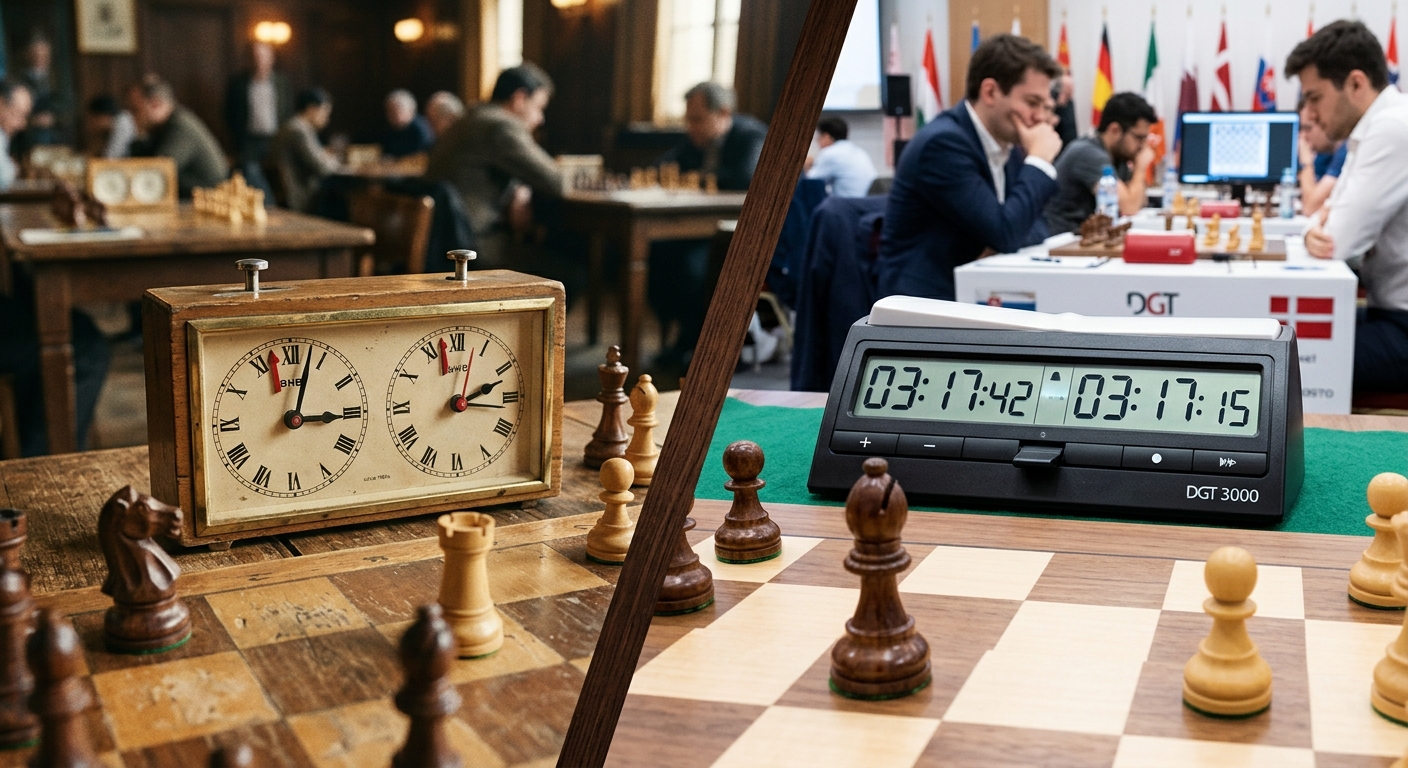
The position is winning. Your rook owns the open file. Your opponent has nowhere useful to go. Then you glance at the clock and realise that the toughest piece on the table has no legal moves at all. It just keeps ticking. Anyone who grew up watching a DOS strategy game chew through its turn knows that strange relationship between thinking and waiting. Chess clocks made that relationship physical, decades before a desktop computer could manage it.
Two clocks turned thinking time into part of the game.
- Mechanical dual clocks gave each player a separate budget and a clear way to hand over the turn.
- Digital clocks made added seconds, delays, and complex timing schedules easier to administer.
- Browser timers brought the same basic idea to everyday screens, with practical limits worth checking before play.
Before the Buttons, Someone Had to Watch the Time
Chess did not begin with a fixed allowance for thought. That sounds pleasant until one player spends an enormous stretch considering a position while everyone else waits. In organised competition, patience alone cannot keep a round on schedule. Players need a limit that applies to both sides.
Early attempts to measure chess thinking time included sandglasses. They addressed the central problem, but demanded attention and handling. The useful breakthrough was to connect two timing mechanisms so that stopping one started the other. Each player could spend their own allocation without spending their opponent's.
Late nineteenth-century tournament play established the paired mechanical clock as a workable answer. Its contribution was easy to understand across a crowded room. Make a move, press a control, and pass responsibility across the board.
Following history of chess clocks reveals a familiar technology pattern. An awkward administrative task becomes a dedicated appliance. Later, electronics make that appliance more flexible. Eventually, software recreates its core function on hardware people already own.
The Mechanical Clock Made Every Turn Tangible
A traditional analogue chess clock contains two faces in one case. A linked control allows one mechanism to run while the other rests. The case might be wood or plastic, but the interaction stays wonderfully direct. You move a piece and press your side.
That press matters. Moving the piece does not itself stop your clock. Until you operate the control, your thinking time continues to disappear. The clock creates a small physical ritual at the end of each turn.
For a retro PC audience, the appeal is familiar. A mechanical clock has the same readable purpose as a chunky joystick or a keyboard with properly distinct keys. You can see where your hand goes. You can feel whether the control moved. There is no menu between intention and action.
Its most memorable detail is the flag. Near the end of the allotted period, the minute hand lifts a small marker. When the hand passes it, the marker drops. That gives players a clearer sign that time has expired than trying to judge the exact position of a moving hand.
The phrase “flag fall” survived the transition to screens. It belongs to that family of old hardware terms that remain useful after the original mechanism disappears.
Time Controls Added Another Layer of Strategy
A clock does more than stop games from lasting all afternoon. It changes which decisions are sensible.
With a generous allowance, you can examine a difficult sacrifice and calculate several replies. With seconds remaining, a move that is easy to execute may become more attractive than a stronger move requiring careful calculation. The board position and the available thinking time become inseparable.
Some traditional tournament schedules required players to complete a specified number of moves before a deadline. Reaching that checkpoint could bring another allocation of time. This created a particular kind of tension: a player might have enough time for the game overall, yet still face a frantic rush before the next control.
Mechanical clocks could support those schedules, but they could not conveniently perform every timing adjustment themselves. Move records and tournament procedures carried part of the workload. The clock measured elapsed time; people handled the surrounding bookkeeping.
That distinction will feel familiar to anyone who kept notes beside an old strategy game. The machine ran part of the system. A pencil and some patience finished the job.
Digital Displays Changed More Than the Appearance
Replacing hands with digits made the remaining time easier to read precisely. The larger change happened inside the case. Electronic control allowed a clock to apply timing rules that would be cumbersome with gears and hands.
A digital tournament clock can offer several periods, different starting allowances, and extra time attached to individual moves. Depending on the model, it may also provide move counters and ways to correct the displayed times.
This flexibility brings a tradeoff. Two analogue faces explain themselves fairly well. A digital clock may hide a timing schedule behind a preset number or a short label. Choosing the wrong mode can produce a perfectly functioning clock running the wrong game.
The setup deserves the same care you would give an old game's configuration screen. A setting that looks harmless can change the whole session. Check the starting allowance, the extra-time method, and any later periods before either player makes a move.
Increments Changed the Final Seconds
An increment adds a fixed amount of time for each move under the selected timing system. A five-minute game with a three-second increment is commonly written as 5+3. Both players begin with five minutes, and the clock credits three seconds per move according to its implementation and settings.
The effect is substantial. Without added time, every second spent is gone for good. With an increment, playing a move in less than the added allowance can build the remaining balance. A player under pressure may recover enough breathing room to keep making considered moves.
Consider a simple example after the starting position has already been played. Your display shows twenty seconds. You spend two seconds on your move, then receive a three-second increment when you press. Your balance becomes twenty-one seconds. Spending eight seconds instead would leave fifteen.
A delay behaves differently. With a simple delay, a short waiting period passes before your main balance begins to decrease. If you move within that window, your main time stays intact. The unused part does not accumulate. Some clocks offer other delay methods, so reading the mode description is worthwhile.
Neither approach removes time pressure. Both give the player a small allowance to keep responding. The practical result is that a long sequence of moves need not consume the last few seconds simply because those moves take time to execute.
How the Main Timing Approaches Feel
| Timing Method | What Happens Each Move | Practical Effect |
|---|---|---|
| Fixed allowance | Time spent comes directly from the remaining balance. | Long endings can become a race against an empty clock. |
| Increment | A fixed amount is credited per move. | Fast moves can build a reserve. |
| Simple delay | A short delay precedes the main countdown. | Fast moves preserve time without accumulating unused delay. |
PC Chess Put the Clock Beside the Board
For players raised on DOS and early Windows chess software, timing became another part of the interface. A program could display the board, record moves, run an opponent, and maintain both clocks on the same screen.
That changed the physical routine. During a game against software, submitting a legal move could also hand over the turn automatically. You no longer needed to reach for a separate button. The program already knew when the move had been accepted.
There is a useful distinction here for anyone replaying an old chess title. A setting that gives the computer a certain amount of thinking time per move is not necessarily a tournament clock. It might control search effort without giving either side a shared budget for the whole game.
Read the manual or experiment with a short session. Watch whether unused time carries forward. Check whether your own clock runs while you consider a move. Those details tell you whether you are adjusting computer strength, playing speed, or an actual time control.
When emulating an older program, check how it measures time before trusting it for serious practice. Depending on its design, changing emulation speed may affect its behaviour. A test against an independent timer can reveal a problem before it spoils a long game.
Browser Timers Bring the Dual Clock Back to the Desk
A standalone browser timer completes an interesting circle. The screen handles the timing, but the chessboard can return to the kitchen table. Two large touch areas replace the paired buttons. You still make a move and pass the clock.
For casual practice, this is convenient. There is no dedicated appliance to store, and changing from a fixed allowance to an increment usually takes little effort. A tablet also gives both players a larger target than a small phone display.
Before relying on a browser timer, check a few ordinary details:
- Keep the display awake and the device powered throughout the session.
- Confirm that both players can reach their control without shifting the device.
- Test pause, reset, and accidental double taps before starting.
- Check what happens when the browser loses focus or the screen locks.
A well-designed timer accounts for elapsed time instead of merely assuming that every scheduled screen update happens exactly on time. Browser background behaviour still varies, which makes testing useful. Dedicated tournament hardware also offers physical controls and a predictable operating environment that a general-purpose device cannot automatically match.
A Small Experiment With Three Different Endings
You can feel the history without collecting old clocks. Use a browser timer and replay the same simple endgame under three conditions:
- Give each player two minutes with no added time. Notice how strongly the shrinking balance affects your choices.
- Restart with two minutes and a three-second increment. Watch whether fast replies let either player recover time.
- Try two minutes with a three-second simple delay, if supported. Compare preserving a balance with actively building one.
The exercise makes the technical differences tangible. The pieces can stay the same while the rhythm changes completely.
The Button Still Belongs to the Game
Mechanical clocks gave chess a visible budget. Digital clocks made that budget programmable. PC software folded it into the board interface, and browser tools made it available wherever a suitable screen happened to be.
For anyone who enjoys old gaming hardware, the enduring detail is the handover. A wooden case, an LCD display, and a touchscreen can all express the same idea: your move is finished, and someone else's time has begun.
That is why the old ticking box still feels relevant. It solved a human problem with a clear physical action. Everything that followed kept that action, or found a way to automate it. The machinery changed. The pressure across the board remains instantly recognisable.
Leave a Comment